Tuesday, September 11, 2012
Elevator Line
"Elevator" Line -- one-sentence summary of your proposed project. This sentence should get us excited. Why do we want to listen to the rest of your presentation? Sell it.


Thursday, September 6, 2012
Artistic Intervention Project
A. Read the project description below and research all of the artist links in the post below. Write a succinct (500 words or less) review of 1 artist and post it to your blog.
B. Post a project statement to your blog. Have a well developed concept you believe in. Solidify your idea until you can tell anyone what your project is about. Know your concept inside and out.
Include in your statement:
Explanation of Theme. -- Themes describe the overarching goals or big picture questions that a project attempts to answer.
Explanation of Tone and Execution -- What's your approach. What will it look/feel like? Your aesthetic choices should compliment the project's theme. You may include Links out/include examples.
Explanation of Objective -- What is the goal of this project?
C. Create and post sketches to compliment your project statement above.
D. Post A/C review to your blog.
Project Description:
This assignment asks you to generate a digital art 'intervention'.
What are you passionate about in regard to what is happening in the world?
What do you most want to intervene upon?
You must take a stance.
You must voice your opinion.
Artists in the modernist/post modernist have often addressed critical issues through their creative practice.
An artistic intervention is an action by an artist in a real world situation for the sake of promoting reflection and altering perceptions.
The objective is to create a work that serves as a visual, cultural critique.
You may use satire and humor to critique real world or online culture.
Good satire is intelligent - poking fun while also encouraging meaningful critique.
Irreverence is acceptable but do so in an intelligent manner.
Sky is the limit for how you deliver your project. It can be a documentation post of a real world intervention. You could create a t-shirt or sticker. You can create a print. You can deliver only to the web. You could create a facebook page or blog. The only rule you must use your digital skills to create and/or document and there must be online access to the finished project. For example if you create a print, t-shirt, sticker etc. --the presentation of your artistic product must be considered, installed and documented. The documentation of your artist product's installation must be documented and available online.
Artist Links:
http://www.billboardliberation.com/
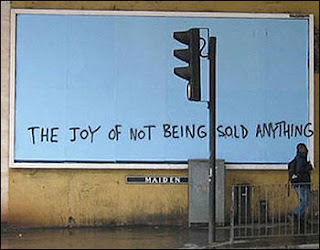


Banksy
Bansky - The joy of not being sold anything
The Onion - some of the best satire online and in print:
http://www.theonion.com/content/index
http://theyesmen.org/
http://www.critical-art.net/
http://www.theyrule.net/
http://www.npr.org/templates/story/story.php?storyId=1487185
http://turbulence.org/Works/oilstandard/
http://www.molleindustria.org/en/tuboflex
http://www.antiwargame.org/
http://www.0100101110101101.org/projects.html
http://www.tmcrew.org/enghome.htm
http://www.appliedautonomy.com/projects.html
http://www.notbored.org/the-scp.html
http://www.revbilly.com/
A spoof website of the George Bush Whitehouse site:
http://whitehouse.georgewbush.org/index.asp
A spoof website of the Barack Obama Whitehouse site:
http://whitehouse.gov1.info/
Some curious corporate logo spoofs and such:
http://indiacorporatewatch.blogspot.com/2005/10/subvertized-part-i-brilliant-spoofs-of.html
http://www.logoblog.org/wordpress/imitating-logos/
The NYtimes "Special Edition" an amazing, elaborate parody that involved the creation of an entire website identical to the NYtimes and a print edition that was freely distributed on the streets of NYC. The Yes Men were involved in this project along with many other artists and activists (including your professor - see story "America's Army Game Cancelled!"):
-watch this first- http://www.youtube.com/watch?v=1vvPvaDkIUo
http://www.nytimes-se.com/
B. Post a project statement to your blog. Have a well developed concept you believe in. Solidify your idea until you can tell anyone what your project is about. Know your concept inside and out.
Include in your statement:
Explanation of Theme. -- Themes describe the overarching goals or big picture questions that a project attempts to answer.
Explanation of Tone and Execution -- What's your approach. What will it look/feel like? Your aesthetic choices should compliment the project's theme. You may include Links out/include examples.
Explanation of Objective -- What is the goal of this project?
C. Create and post sketches to compliment your project statement above.
D. Post A/C review to your blog.
Project Description:
This assignment asks you to generate a digital art 'intervention'.
What are you passionate about in regard to what is happening in the world?
What do you most want to intervene upon?
You must take a stance.
You must voice your opinion.
Artists in the modernist/post modernist have often addressed critical issues through their creative practice.
An artistic intervention is an action by an artist in a real world situation for the sake of promoting reflection and altering perceptions.
The objective is to create a work that serves as a visual, cultural critique.
You may use satire and humor to critique real world or online culture.
Good satire is intelligent - poking fun while also encouraging meaningful critique.
Irreverence is acceptable but do so in an intelligent manner.
Sky is the limit for how you deliver your project. It can be a documentation post of a real world intervention. You could create a t-shirt or sticker. You can create a print. You can deliver only to the web. You could create a facebook page or blog. The only rule you must use your digital skills to create and/or document and there must be online access to the finished project. For example if you create a print, t-shirt, sticker etc. --the presentation of your artistic product must be considered, installed and documented. The documentation of your artist product's installation must be documented and available online.
Artist Links:
http://www.billboardliberation.com/
The Billboard Liberation Front is a group of San Franciscan message-makers who aim to repurpose and “improve” billboard messages by painting or pasting on top of preexisting billboards. The group began its mission in 1977 and has grown into a worldwide phenomenon by collecting images on the web.
From the Billboard Liberation Front manifesto: “And so we see, the Ad defines our world, creating both the focus on ‘image’ and the culture of consumption that ultimately attract and inspire all individuals desirous of communicating to their fellow man in a profound fashion. It is clear that He who controls the Ad speaks with the voice of our Age.”
http://peopleproducts123.com/
People Products 123, The Anti-Advertising Agency, project website.
People Products 123, The Anti-Advertising Agency, project website.
The Anti-Advertising Agency creates subversive media that opposes the role of advertising in contemporary society. Many of their projects are participatory, which means that viewers become doers or art-makers. In People Products 123, participants download package designs that feature images and information about the workers responsible for producing the consumable product. The participant prints the package designs, and shop-drops the re-covered product in the store, where an unassuming shopper would purchase the product contained in the newly informative packaging.
Barbie Liberation Organization


Bansky - The joy of not being sold anything
The Onion - some of the best satire online and in print:
http://www.theonion.com/content/index
http://theyesmen.org/
http://www.critical-art.net/
http://www.theyrule.net/
http://www.npr.org/templates/story/story.php?storyId=1487185
http://turbulence.org/Works/oilstandard/
http://www.molleindustria.org/en/tuboflex
http://www.antiwargame.org/
http://www.0100101110101101.org/projects.html
http://www.tmcrew.org/enghome.htm
http://www.appliedautonomy.com/projects.html
http://www.notbored.org/the-scp.html
http://www.revbilly.com/
A spoof website of the George Bush Whitehouse site:
http://whitehouse.georgewbush.org/index.asp
A spoof website of the Barack Obama Whitehouse site:
http://whitehouse.gov1.info/
Some curious corporate logo spoofs and such:
http://indiacorporatewatch.blogspot.com/2005/10/subvertized-part-i-brilliant-spoofs-of.html
http://www.logoblog.org/wordpress/imitating-logos/
The NYtimes "Special Edition" an amazing, elaborate parody that involved the creation of an entire website identical to the NYtimes and a print edition that was freely distributed on the streets of NYC. The Yes Men were involved in this project along with many other artists and activists (including your professor - see story "America's Army Game Cancelled!"):
-watch this first- http://www.youtube.com/watch?v=1vvPvaDkIUo
http://www.nytimes-se.com/
Assignment Write-up Details
Each assignment is to be accompanied by a separate Assignment Write-up describing your process - the idea, both the conceptual and technical challenges you were dealing with, your approach, your frustrations, what you learned, as well as reference to any of the weekly readings and or screenings. These write-ups should be succinct, no more than 500 words.
Thursday, August 30, 2012
Due 9/4
A. Revise proj 1. Bring your .psd and source file folder.Do not forget to post an assignment write-up to your blog. Review syllabus for assignment write-up details.
B. Complete proj 2. A companion piece to proj 1 or a jump off from proj 1 as discussed in class. This project must also be print quality 8.5 X 11.
C. Purchase and activate your color print card.
D. A/C Review for week 8/28-9/3
Tuesday, August 28, 2012
Due 8/30
A. Re-Review tutorials and update notes.
B. Complete proj 1. Bring your .psd and source file folder.Do not forget to post an assignment write-up to your blog. Review syllabus for assignment write-up details.
C. Purchase and activate your color print card.
B. Complete proj 1. Bring your .psd and source file folder.Do not forget to post an assignment write-up to your blog. Review syllabus for assignment write-up details.
C. Purchase and activate your color print card.
Thursday, August 23, 2012
Due 8/28 -- Photoshop Intro
A. A/C review posted to your blog.
B. Master Sketch and Revised Final Project Statement posted to your blog.
C. Collect and Capture of Source Material. All analogue sources must be in digital format.
D. Experiment with the techniques presented below and bring in a work in progress photoshop file(.psd). Bring all source files to class. There will be time in class to work.
You must watch all links below. You need to take notes and start a keyboard short cut cheat sheet. It is a good idea to have a test file open in photoshop and pause the tutorial videos experiment in your test file then return and continue to watch. There will be a practical quiz over the techniques presented below. You may use your notes and keyboard short cut sheet during the quiz.
Creating a Collage -- If you were your scrap book lady -- cheesy but has good techniques -- take notes -- 6:37
Concept and Technique -- Do not freak out. Do not attempt to follow along with this video with your experiment file. Watch this once and listen. Soak it up. You will then watch other videos that expand on her techniques. After you complete the tutorials below return to this video and watch it again.
Video 24:00
Layer Techniques Video -- 38:00
Quick Selection Tool and Masking Basics -- 12:45
Photoshop Toolbox Video Tutorial - 5:22
Using the marquee and lasso tools Video -- 7:31
Content-Aware Fill Video -- 3:00
Content-Aware Fill Video -- 3:44
Non-destructive transformations Video - 4:09
Making Selections -- Article
using improved selecting and masking video - 12:15
refining selection edged video - 5:46
arranging layers video - 9:26
includes locking and clipping mask
Introduction to adjustment layers video - 8:04
mixing layers with blending modes - 6:45
very important!!! write down the keyboard shutout! excellent for creative effects and technical tasks -- also good example of transform distort tool.
Blending Images with a mask video - 5:00
Control tonal range and color using Adjustment Layer video -- 6:52
---------------------------------------------------------------------------------------------------------
Do not watch the link below if you are too overwhelmed.
Our next project will include the technique below -- aka we will make something move in your collage. The project 2 will be for web delivery.
Subscribe to:
Posts (Atom)